Table of Contents
Why Golf Simulators Need Special Projectors
A golf simulator is not a home theater. The requirements differ in ways that make most standard projectors completely unusable, and picking the wrong model wastes hundreds or thousands of dollars. Before looking at specific products, it helps to understand the three factors that drive every recommendation on this page.
The Ball Blocks the Beam
This is the deal-breaker. A standard projector with a 1.5 throw ratio sits 12 to 15 feet behind the screen, which places it squarely in the path of every golf ball you hit. Golf balls leave the clubface at 100 to 170 mph depending on the club. One strike destroys a projector lens beyond repair. Even ceiling-mounting a standard projector does not solve the problem reliably because the ball arc at driver speed can reach 8 to 10 feet of height within the first few feet of flight.
Ultra short throw projectors eliminate this risk entirely by sitting just inches from the base of the impact screen, projecting upward at a steep angle. Short throw models with ratios around 0.50 sit 4 to 6 feet from the screen, which usually places them below the typical ball flight path but may still need a protective enclosure for safety.
Brightness Has to Overcome Sim Software
Golf simulation software presents a fundamentally different image than movies or television. The scenes are overwhelmingly bright: blue skies, sunlit fairways, white sand bunkers, and UI overlays showing yardage, wind speed, and club data. Where a dark home theater projector at 1,500 lumens looks cinematic with movie content, that same projector makes golf software look dim and washed out. You need at least 3,000 lumens to keep the image punchy and readable, and 3,500 to 4,200 lumens if your room has any ambient light at all.
Input Lag Affects the Feel
When you strike a ball in a golf simulator, the launch monitor captures the data and the software renders the flight path on screen. Any delay between the swing and the visual response breaks the immersion. While golf sims are less demanding than competitive FPS gaming, an input lag under 30 milliseconds keeps everything feeling connected and responsive. Projectors above 50ms of lag create a noticeable disconnect between your swing and what you see on screen.
Screen Size and Throw Coverage
Most golf simulator setups use impact screens between 100 and 150 inches diagonal. The projector needs to fill that screen from whatever distance you can place it. UST models handle this from inches away. Short throw models handle it from 4 to 6 feet. The width of your impact screen should always exceed the projected image by at least 12 inches on each side to catch off-center strikes that fall outside the display area.
Resolution: 4K Preferred, 1080p Acceptable
At the 8 to 12 foot viewing distance typical in a golf sim room, 4K resolution delivers noticeably sharper text, yardage readouts, and green contour detail than 1080p. It is worth paying for if your budget allows. However, a bright 1080p projector will outperform a dim 4K projector every time in a golf simulator context. Prioritize brightness first, resolution second.
UST vs Short Throw for Golf Sims
Both ultra short throw and short throw projectors work in golf simulators, but they have distinct trade-offs that affect your budget, installation, and safety.
Ultra Short Throw (Throw Ratio Under 0.25)
Distance from screen: 6 to 18 inches for a 100-120" image
Typical price range: $2,500 to $6,500
Ball strike risk: Virtually zero. The projector sits directly beneath the impact screen.
- Cleanest installation with no beam crossing the room
- No shadow from your body during the swing
- Most models are laser-based with 20,000+ hour lifespan
- Higher cost per lumen compared to short throw
- Requires a flat surface or shelf directly beneath the screen
- More sensitive to screen surface irregularities at steep projection angles
Short Throw (Throw Ratio 0.45 to 0.60)
Distance from screen: 4 to 6 feet for a 100-120" image
Typical price range: $1,000 to $1,800
Ball strike risk: Low if mounted on a low shelf below ball flight path. A protective shield is recommended.
- Significantly lower cost for equivalent brightness and resolution
- Often higher lumen output than UST models at the same price
- More forgiving of minor screen surface imperfections
- Requires a protective enclosure or acrylic shield in front
- Slight shadow possible if you stand between projector and screen
- Lamp-based models need bulb replacement every 3,000 to 5,000 hours
Our recommendation: If your budget is $2,500 or more for the projector alone, go UST. The installation is cleaner, the safety margin is absolute, and laser light sources eliminate bulb replacement costs. If you need to keep the projector under $1,500, short throw models from Optoma deliver outstanding brightness and 4K resolution at a fraction of the cost. Build a simple protective shelf and you are set.
Top 8 Golf Simulator Projectors 2026
Every projector below meets the core golf simulator requirements: short or ultra short throw ratio, 2,800+ lumens, and solid input lag performance. They are ordered by use case rather than rank because the right choice depends on your priorities and budget.

AWOL Vision LTV-3500 Pro
Best OverallThe AWOL Vision LTV-3500 Pro delivers 3,500 lumens with a 0.18 UST throw ratio, placing it just inches from the screen for zero ball-strike risk. Dolby Vision HDR and a triple laser light source produce vivid course colors with a 25,000+ hour lifespan. The ideal pick for serious golf sim builds that want top-tier image quality under $5,000.
- 3,500 lumens
- 4K UHD
- 0.18:1 throw ratio (UST)
- Triple Laser

Epson EpiqVision Ultra LS800
Best BrightnessThe brightest UST on this list at 4,000 lumens, the Epson LS800 thrives in rooms with ambient light from windows or overhead fixtures. Its 0.16 throw ratio is the shortest here, placing it practically flush against the screen base. Epson's 3LCD technology delivers equal white and color brightness for accurate golf course rendering.
- 4,000 lumens
- 4K UHD
- 0.16:1 throw ratio (UST)
- 3LCD Laser

Hisense PX3-PRO
Best Value USTHisense's TriChroma laser covers over 110% of BT.2020, producing greens that look like real golf course grass and skies with natural depth. At 3,000 lumens it handles light-controlled sim rooms well, and dual Dolby Vision / HDR10+ support adds format flexibility. A strong value pick for UST builds that prioritize color accuracy.
- 3,000 lumens
- 4K UHD
- 0.21:1 throw ratio (UST)
- TriChroma Laser
LG CineBeam HU915QE
Best for Bright RoomsBuilt for garage and basement sim setups with windows or open doors, the LG HU915QE punches through ambient light at 3,700 lumens with triple laser technology. LG's image processing handles ball flight motion smoothly, and the 0.19 throw ratio keeps it tight against the screen base. Max screen size tops out at 120 inches, which suits most golf sim rooms.
- 3,700 lumens
- 4K UHD
- 0.19:1 throw ratio (UST)
- Triple Laser

Optoma UHD35STx
Best Short Throw 4KArguably the best value on this list, the UHD35STx delivers 4K resolution and 3,600 lumens at a 0.50 throw ratio for about 4.5 feet from a 100-inch screen. The 240Hz refresh rate and 4.2ms input lag make it exceptional for dual golf sim and gaming use. Lamp-based light source needs replacement every 4,000 hours, but at 10 hours per week that is roughly one bulb every 7-8 years.
- 3,600 lumens
- 4K UHD
- 0.50:1 throw ratio
- Lamp (240W)
Optoma GT2100HDR
Best Short Throw GamingThe brightest projector on this list at 4,200 lumens, the GT2100HDR handles garage installations with overhead fluorescents or open bay doors effortlessly. The DuraCore laser lasts 30,000 hours with zero bulb replacements. It trades 4K for raw brightness, and in rooms with ambient light challenges its sheer output outperforms dimmer 4K models.
- 4,200 lumens
- 1080p
- 0.496:1 throw ratio
- Laser (DuraCore)
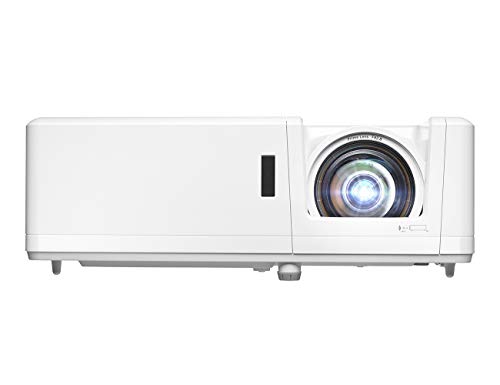
Optoma GT1090HDR
Budget PickThe proven workhorse of the golf simulator community, the GT1090HDR delivers 4,200 lumens of laser brightness with a 0.50 short throw ratio producing a 100-inch image from about 4 feet. The 30,000-hour DuraCore laser eliminates lamp replacements entirely. HDR10 adds image depth, and color accuracy is strong for a 1080p projector.
- 4,200 lumens
- 1080p
- 0.50:1 throw ratio
- Laser (DuraCore)

Samsung The Premiere LSP9T
Premium USTThe luxury option on this list, the LSP9T's triple laser engine produces exceptional color accuracy and contrast that makes course rendering look photorealistic. At 2,800 lumens it is best suited for sim rooms with full light control. If your space doubles as a dedicated entertainment room for movies and sports, the LSP9T's image quality justifies the premium price.
- 2,800 lumens
- 4K UHD
- 0.19:1 throw ratio (UST)
- Triple Laser
Quick Comparison Table
| Projector | Lumens | Resolution | Throw Ratio | Light Source | Price |
|---|---|---|---|---|---|
| AWOL Vision LTV-3500 Pro | 3,500 | 4K | 0.18 (UST) | Triple Laser | $4,000-$5,000 |
| Epson LS800 | 4,000 | 4K | 0.16 (UST) | 3LCD Laser | $2,800-$3,500 |
| Hisense PX3-PRO | 3,000 | 4K | 0.21 (UST) | TriChroma Laser | $2,800-$3,500 |
| LG HU915QE | 3,700 | 4K | 0.19 (UST) | Triple Laser | $3,500-$4,500 |
| Optoma UHD35STx | 3,600 | 4K | 0.50 | Lamp | $1,000-$1,300 |
| Optoma GT2100HDR | 4,200 | 1080p | 0.496 | Laser | $1,000-$1,300 |
| Optoma GT1090HDR | 4,200 | 1080p | 0.50 | Laser | $1,500-$1,800 |
| Samsung LSP9T | 2,800 | 4K | 0.19 (UST) | Triple Laser | $5,000-$6,500 |
Mounting and Setup Tips for Golf Simulator Projectors
Getting the projector mounted correctly is half the battle. Improper placement causes keystoned images, uneven brightness, and wasted screen area. These tips apply to both UST and short throw installations.
UST Projector Placement
UST projectors need a flat, stable surface directly beneath the center of the impact screen. A low shelf, AV cabinet, or custom-built platform works well. The projector should sit 6 to 18 inches from the screen surface depending on the model and desired image size. Use the manufacturer's throw distance chart for your specific screen size. Most UST projectors include built-in keystone adjustment, but physical alignment always produces a better image than digital correction. Take the time to position it precisely before securing it in place.
Ensure the shelf or cabinet allows adequate airflow around the projector. UST laser projectors generate significant heat from the light engine, and blocked ventilation causes thermal throttling or shutdown. Leave at least 6 inches of clearance on exhaust sides. If you build an enclosed cabinet, add ventilation fans with intake on the cool side and exhaust on the hot side.
Short Throw Projector Placement
Short throw projectors with 0.50 throw ratios sit approximately 4 to 5 feet from the screen for a 100-inch image. Mount the projector on a low shelf or floor stand, positioned below the expected ball flight path. The center of the lens should be at or below the bottom edge of the projected image to minimize the chance of a ball strike. Build a protective shield from 1/4-inch clear polycarbonate mounted in front of and above the projector. This shield deflects any ball that drops short of the impact screen.
Use our throw distance calculator to determine the exact projector-to-screen distance for your desired screen size and specific projector model. Even a few inches of error changes the image size noticeably at short throw ratios.
Screen Alignment
Project a test pattern or grid image before your first sim session. Check that the projected rectangle is square to the impact screen edges. With UST projectors, slight left-right positioning errors cause trapezoidal distortion that digital keystone cannot fully correct without sacrificing sharpness. Take the time to physically align the projector center with the screen center. Mark the projector's position with tape or mounting brackets so it can be returned to the exact spot if bumped during a sim session.
Cable Routing
Run HDMI and power cables along the base of the wall or through the floor to avoid creating trip hazards in the hitting zone. If the projector sits on a shelf beneath the screen, use a right-angle HDMI adapter to keep the cable flat against the wall. Fiber optic HDMI cables are recommended for runs longer than 15 feet to maintain 4K signal integrity. Check our cable length calculator to plan cable runs accurately.
Projector Protection
For UST projectors positioned directly beneath the impact screen, the screen itself provides protection from straight shots. The risk comes from topped balls that hit the ground in front of the screen and bounce unpredictably. A low angled deflector or bumper rail in front of the projector catches these bounces. For short throw projectors, the polycarbonate shield mentioned above is essential. Never run a sim session with an unprotected projector in the room, even if you think you never miss that badly.
How Many Lumens for a Golf Simulator?
Brightness is arguably the most important spec for a golf sim projector. Here is how to determine the right lumen count for your specific setup.
Minimum: 2,800 Lumens
This works in a fully light-controlled room with no windows, no overhead lights during play, and a screen size of 120 inches or smaller. The Samsung LSP9T at 2,800 lumens delivers a gorgeous image under these conditions. If you can guarantee a dark environment every time you play, this brightness level is sufficient and lets you prioritize color quality and contrast instead.
Recommended: 3,000 to 3,700 Lumens
This is the sweet spot for most golf simulator setups. It handles rooms with minor ambient light from doorways or gaps around blackout curtains while maintaining vibrant color on bright simulator software. The AWOL Vision LTV-3500 Pro (3,500 lumens), Hisense PX3-PRO (3,000 lumens), and LG HU915QE (3,700 lumens) all fall in this range. You get a bright, punchy image on screens up to 130 inches without fighting ambient light.
High Performance: 4,000+ Lumens
Garage installations with overhead shop lights, spaces with windows you cannot or do not want to cover, and screens larger than 130 inches all benefit from 4,000+ lumens. The Epson LS800 (4,000 lumens), Optoma GT2100HDR (4,200 lumens), and Optoma GT1090HDR (4,200 lumens) dominate this tier. The extra brightness provides headroom that keeps the image looking good even in imperfect lighting conditions.
Quick Rule of Thumb
Multiply your screen width in feet by 350 to get a baseline lumen target for a dark room. For a room with moderate ambient light, multiply by 500 instead. A 10-foot-wide screen (approximately 120 inches diagonal) needs 3,500 lumens in the dark or 5,000 lumens in a lit room. Use our brightness calculator for a more precise figure based on your actual room conditions.
Plan Your Golf Simulator Setup
Use our calculators to determine exact projector placement, brightness requirements, and screen sizing for your golf simulator room. Then explore the full golf simulator setup guide for equipment beyond the projector.
Frequently Asked Questions
No, standard throw projectors are not suitable for golf simulators. A regular projector mounts 10-15 feet from the screen, placing it directly in the ball flight path. Golf balls travel over 150 mph and would destroy the projector immediately. You need an ultra short throw (UST) or short throw projector that sits close to the screen, below or beside the impact zone, completely outside the ball and swing path.
You need at least 3,000 lumens for a golf simulator projector, with 3,500-4,200 lumens being ideal. Golf simulation software displays bright scenes with blue skies, green fairways, and white UI overlays that demand more brightness than dark movie content. If your sim room has windows or ambient light, aim for 4,000+ lumens. All eight projectors in our guide deliver 2,800-4,200 lumens to handle golf sim software effectively.
For golf simulators, a throw ratio under 0.50 is ideal. Ultra short throw projectors with ratios of 0.16-0.25 sit just inches from the screen and are the safest option since they are completely out of the ball path. Short throw projectors with ratios around 0.50 sit 4-5 feet from the screen and also work well, though they require a protective enclosure or shelf to shield from mishit balls that drop short.
UST projectors are generally preferred because they sit directly beneath the impact screen, completely out of the ball flight zone with zero risk of ball strikes. Short throw projectors sit 4-6 feet from the screen, which is usually safe but may need a protective shield. However, short throw models like the Optoma UHD35STx cost significantly less ($1,000-1,300 vs $2,800-5,000 for UST) and often deliver higher brightness. Choose UST for maximum safety and clean setup, or short throw for better value.
Input lag matters but is less critical for golf simulators than for competitive gaming. Most golf simulation software processes launch monitor data and renders the ball flight with its own animation timing, so a few extra milliseconds of projector lag are not noticeable. Anything under 30ms is excellent for golf sim use. That said, lower input lag does make the overall feel snappier when navigating menus and watching ball flight. If you also plan to use the projector for gaming, prioritize sub-20ms models.
Most golf simulators use screens between 100 and 150 inches diagonal. The ideal size depends on your room width and the projector's capabilities. A 120-inch (about 10 feet wide in 16:9) screen is the most common choice, providing immersive gameplay without requiring an extremely wide room. If your room is 14+ feet wide, you can go up to 150 inches for a more enveloping experience. Always ensure the impact screen extends at least 12 inches beyond the projected image on all sides.
4K resolution is preferred but not strictly required. At typical golf simulator viewing distances of 8-12 feet, 4K delivers noticeably sharper text, yardage numbers, and green detail compared to 1080p. If your budget allows, choose 4K. However, a bright 1080p projector like the Optoma GT2100HDR or GT1090HDR at 4,200 lumens will look better than a dim 4K projector. Brightness matters more than resolution for golf simulators.
UST projectors positioned directly beneath the impact screen are naturally protected since balls hit the screen above. For short throw projectors sitting 4-6 feet back, build a protective enclosure using clear polycarbonate panels or a recessed shelf with an acrylic shield in front. Some builders create a low cabinet with a ventilated top that houses both the projector and PC. Never leave a projector exposed in the ball flight zone. Also ensure your enclosure allows adequate airflow since projectors generate significant heat.